Store tasks and derive the count
Give the screen three sample tasks and a summary line that counts the unfinished ones. The count is derived, so nothing keeps it in sync by hand.
Start from the lesson 1 checkpoint in example/my_task_list.dart. Restart the
app after this lesson, because it adds hooks.
Add the signal and the computed count
In build, before final theme, add the task signal and the computed value:
    final tasks = useSignal(<({int id, String title, bool done})>[
      (id: 0, title: 'Read the hooks guide', done: false),
      (id: 1, title: 'Run the counter example', done: true),
      (id: 2, title: 'Build a Signals app', done: false),
    ]);
    final remaining = useComputed(
      () => tasks.value.where((task) => !task.done).length,
    );
useSignal creates the signal on the first build and returns the same signal
on every later build. useComputed owns a value derived from it. Signals
tracks the tasks.value read inside the computation, so replacing the list
updates the count.
New Dart syntax.
({int id, String title, bool done})is a record type with named fields, and<...>[...]declares a list of those records.() => ...is a function literal passed touseComputed.wherekeeps the unfinished records andlengthcounts them.
Show the summary and the task titles
Replace the placeholder Expanded with the summary and a scrollable list of
titles:
          Text('${remaining.value} of ${tasks.value.length} remaining'),
          Expanded(
            child: ScrollBox(
              child: Column(
                crossAxisAlignment: CrossAxisAlignment.start,
                children: [for (final task in tasks.value) Text(task.title)],
              ),
            ),
          ),
The collection for creates one widget for each record. ${...} puts a value
into the summary text. These rows are read-only; lesson 3 adds the completion
control.
Run it
dart run example/my_task_list.dartOne seed task has done: true, so the summary reads 2 of 3 remaining.
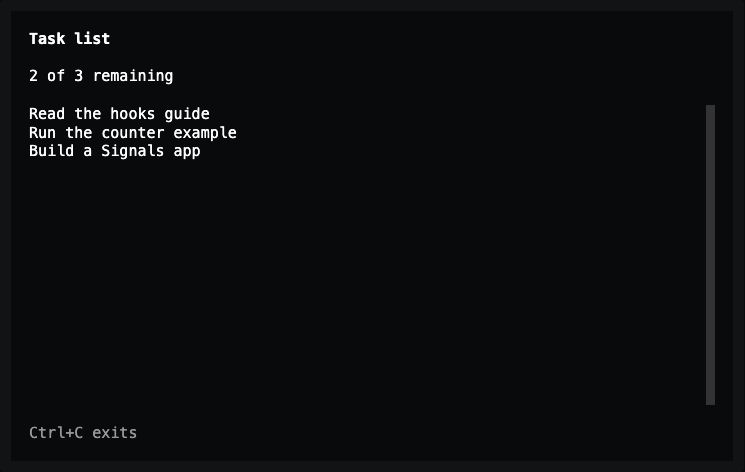
Lesson 2 — the computed value counts the two unfinished records.
Nothing recalculates the count on a timer or in an effect. useComputed reads
the signal, so the summary is always a function of the stored list.
Exact changes for lesson 2
--- lesson-1
+++ lesson-2
@@ -8,6 +8,14 @@

   @override
   Widget build(BuildContext context) {
+    final tasks = useSignal(<({int id, String title, bool done})>[
+      (id: 0, title: 'Read the hooks guide', done: false),
+      (id: 1, title: 'Run the counter example', done: true),
+      (id: 2, title: 'Build a Signals app', done: false),
+    ]);
+    final remaining = useComputed(
+      () => tasks.value.where((task) => !task.done).length,
+    );
     final theme = Theme.of(context);

     return Container(
@@ -21,7 +29,15 @@
             'Task list',
             style: TextStyle(fontWeight: FontWeight.bold),
           ),
-          const Expanded(child: Text('Your tasks will appear here.')),
+          Text('${remaining.value} of ${tasks.value.length} remaining'),
+          Expanded(
+            child: ScrollBox(
+              child: Column(
+                crossAxisAlignment: CrossAxisAlignment.start,
+                children: [for (final task in tasks.value) Text(task.title)],
+              ),
+            ),
+          ),
           Text('Ctrl+C exits', style: TextStyle(color: theme.textMuted)),
         ],
       ),
Complete code after lesson 2
import 'package:noir/noir.dart';
import 'package:noir_signals/noir_signals.dart';

void main() => runTuiApp(const TaskListApp(), enableMouse: true);

class TaskListApp extends SignalWidget {
  const TaskListApp({super.key});

  @override
  Widget build(BuildContext context) {
    final tasks = useSignal(<({int id, String title, bool done})>[
      (id: 0, title: 'Read the hooks guide', done: false),
      (id: 1, title: 'Run the counter example', done: true),
      (id: 2, title: 'Build a Signals app', done: false),
    ]);
    final remaining = useComputed(
      () => tasks.value.where((task) => !task.done).length,
    );
    final theme = Theme.of(context);

    return Container(
      color: theme.surface,
      padding: const EdgeInsets.symmetric(horizontal: 2, vertical: 1),
      child: Column(
        crossAxisAlignment: CrossAxisAlignment.start,
        spacing: 1,
        children: [
          const Text(
            'Task list',
            style: TextStyle(fontWeight: FontWeight.bold),
          ),
          Text('${remaining.value} of ${tasks.value.length} remaining'),
          Expanded(
            child: ScrollBox(
              child: Column(
                crossAxisAlignment: CrossAxisAlignment.start,
                children: [for (final task in tasks.value) Text(task.title)],
              ),
            ),
          ),
          Text('Ctrl+C exits', style: TextStyle(color: theme.textMuted)),
        ],
      ),
    );
  }
}
Previous: Create the screen · Next: Complete a task.