Complete a task
Turn the read-only titles into checkboxes. Completing a task updates its row and the summary together.
Start from the lesson 2 checkpoint in example/my_task_list.dart. Restart the
app after this lesson, because the rows change identity.
Replace each title with a checkbox
In the task-area Column, replace Text(task.title) with a Checkbox:
                  for (final task in tasks.value)
                    Checkbox(
                      key: ValueKey<String>('task-${task.id}'),
                      label: task.title,
                      value: task.done,
                      onChanged: (done) {
                        tasks.value = [
                          for (final item in tasks.value)
                            if (item.id == task.id)
                              (id: item.id, title: item.title, done: done)
                            else
                              item,
                        ];
                      },
                    ),
Checkbox is a controlled widget: value shows the stored state and
onChanged receives the requested state. The callback builds a new list, keeps
every other record, and replaces only the matching one.
New Dart syntax. The collection
if/elsechooses one element for each item in the loop. It replaces the record whoseidmatches and keeps the others unchanged.
Assigning a new list to tasks.value notifies the observers. Changing the
existing list in place would skip that assignment, so the screen would not
update.
The stable ValueKey uses the task ID. A row keeps its identity when another
row is hidden or removed later.
Update the footer
The screen now accepts keyboard input, so name the keys:
          Text(
            'Tab moves · Space toggles · Ctrl+C exits',
            style: TextStyle(color: theme.textMuted),
          ),
Run it
dart run example/my_task_list.dartClick Read the hooks guide, or press Tab until its checkbox has focus and then press Space. The summary changes to 1 of 3 remaining.
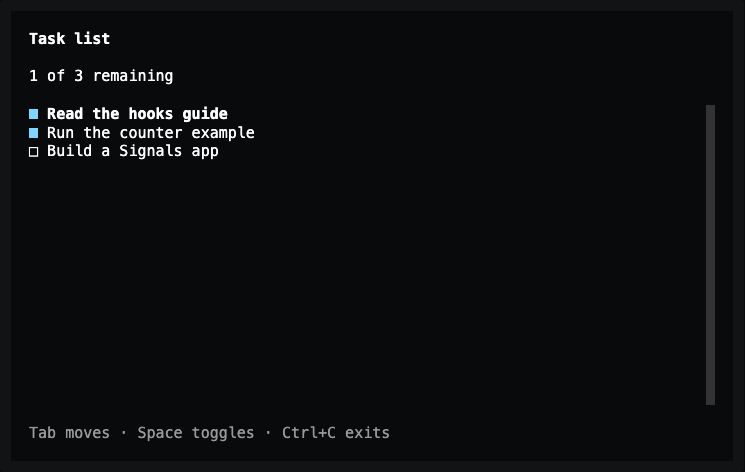
Lesson 3 — the checkbox and the computed count change together.
No effect and no second count variable are needed. The summary follows the
stored list because useComputed reads it.
Exact changes for lesson 3
--- lesson-2
+++ lesson-3
@@ -34,11 +34,30 @@
             child: ScrollBox(
               child: Column(
                 crossAxisAlignment: CrossAxisAlignment.start,
-                children: [for (final task in tasks.value) Text(task.title)],
+                children: [
+                  for (final task in tasks.value)
+                    Checkbox(
+                      key: ValueKey<String>('task-${task.id}'),
+                      label: task.title,
+                      value: task.done,
+                      onChanged: (done) {
+                        tasks.value = [
+                          for (final item in tasks.value)
+                            if (item.id == task.id)
+                              (id: item.id, title: item.title, done: done)
+                            else
+                              item,
+                        ];
+                      },
+                    ),
+                ],
               ),
             ),
           ),
-          Text('Ctrl+C exits', style: TextStyle(color: theme.textMuted)),
+          Text(
+            'Tab moves · Space toggles · Ctrl+C exits',
+            style: TextStyle(color: theme.textMuted),
+          ),
         ],
       ),
     );
Complete code after lesson 3
import 'package:noir/noir.dart';
import 'package:noir_signals/noir_signals.dart';

void main() => runTuiApp(const TaskListApp(), enableMouse: true);

class TaskListApp extends SignalWidget {
  const TaskListApp({super.key});

  @override
  Widget build(BuildContext context) {
    final tasks = useSignal(<({int id, String title, bool done})>[
      (id: 0, title: 'Read the hooks guide', done: false),
      (id: 1, title: 'Run the counter example', done: true),
      (id: 2, title: 'Build a Signals app', done: false),
    ]);
    final remaining = useComputed(
      () => tasks.value.where((task) => !task.done).length,
    );
    final theme = Theme.of(context);

    return Container(
      color: theme.surface,
      padding: const EdgeInsets.symmetric(horizontal: 2, vertical: 1),
      child: Column(
        crossAxisAlignment: CrossAxisAlignment.start,
        spacing: 1,
        children: [
          const Text(
            'Task list',
            style: TextStyle(fontWeight: FontWeight.bold),
          ),
          Text('${remaining.value} of ${tasks.value.length} remaining'),
          Expanded(
            child: ScrollBox(
              child: Column(
                crossAxisAlignment: CrossAxisAlignment.start,
                children: [
                  for (final task in tasks.value)
                    Checkbox(
                      key: ValueKey<String>('task-${task.id}'),
                      label: task.title,
                      value: task.done,
                      onChanged: (done) {
                        tasks.value = [
                          for (final item in tasks.value)
                            if (item.id == task.id)
                              (id: item.id, title: item.title, done: done)
                            else
                              item,
                        ];
                      },
                    ),
                ],
              ),
            ),
          ),
          Text(
            'Tab moves · Space toggles · Ctrl+C exits',
            style: TextStyle(color: theme.textMuted),
          ),
        ],
      ),
    );
  }
}
Previous: Store tasks and derive the count · Next: Add a task.