Add a task
Add an editable field and an Add button. The field keeps its text across rebuilds, and a successful add clears it.
Start from the lesson 3 checkpoint in example/my_task_list.dart. Restart the
app after this lesson: it adds hooks, and the expected count below assumes the
three seed tasks, not the row you completed in lesson 3.
Retain the draft and the next ID
Add final draft = useTextEditingController(); as the first hook, and
final nextId = useRef(3); after the computed value:
final draft = useTextEditingController(); final nextId = useRef(3);useTextEditingController owns the text, the selection, and the caret, and
disposes the controller when the screen unmounts. useRef retains a plain
value. Changing a ref does not request a rebuild, which is what an ID counter
needs.
Add one function that owns the change
After the hooks and the theme lookup, add a local function:
    void addTask() {
      final title = draft.text.trim();
      if (title.isEmpty) return;
      tasks.value = [
        ...tasks.value,
        (id: nextId.value++, title: title, done: false),
      ];
      draft.clear();
    }
New Dart syntax.
...tasks.valuespreads the old records into the new list.nextId.value++uses the current ID and then increments it.
Blank input is ignored. A successful add clears the controller explicitly.
Add the composer row
Insert this Row after the title. Expanded gives the field the width that
the Add button does not use:
          Row(
            spacing: 1,
            children: [
              Expanded(
                child: TextInput(
                  key: const ValueKey<String>('task-draft'),
                  controller: draft,
                  autofocus: true,
                  placeholder: 'New task',
                  onSubmit: addTask,
                ),
              ),
              Button(
                key: const ValueKey<String>('add-task'),
                label: 'Add',
                onPressed: addTask,
              ),
            ],
          ),
Both callbacks receive the function reference addTask, without parentheses.
Noir calls it when the reader submits the field or presses the button. Writing
addTask() here would change state while the widget builds.
Update the footer to name the new key:
          Text(
            'Enter adds · Tab moves · Space toggles · Ctrl+C exits',
            style: TextStyle(color: theme.textMuted),
          ),
Run it
dart run example/my_task_list.dartType Ship the guide and press Enter. The new row appears, the field clears, and the summary changes to 3 of 4 remaining.
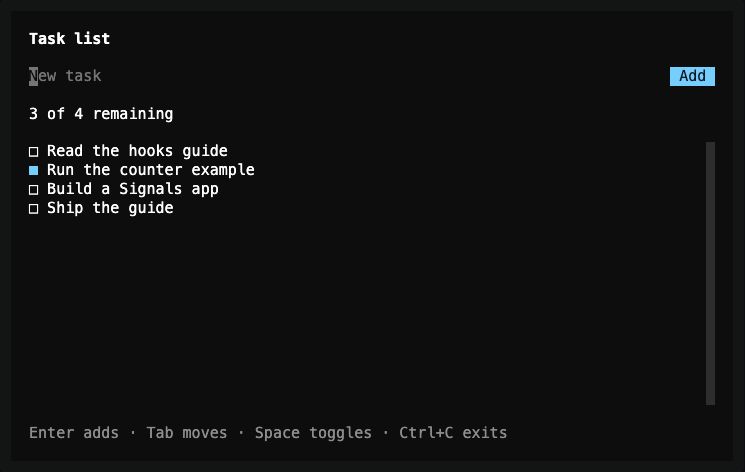
Lesson 4 — the controller survives the signal-driven rebuild, and
draft.clear() empties it after the add.
Assigning tasks.value rebuilds the whole screen, including the field. The
text stays because the hook, not the widget, owns the controller.
Exact changes for lesson 4
--- lesson-3
+++ lesson-4
@@ -8,6 +8,7 @@

   @override
   Widget build(BuildContext context) {
+    final draft = useTextEditingController();
     final tasks = useSignal(<({int id, String title, bool done})>[
       (id: 0, title: 'Read the hooks guide', done: false),
       (id: 1, title: 'Run the counter example', done: true),
@@ -16,8 +17,19 @@
     final remaining = useComputed(
       () => tasks.value.where((task) => !task.done).length,
     );
+    final nextId = useRef(3);
     final theme = Theme.of(context);

+    void addTask() {
+      final title = draft.text.trim();
+      if (title.isEmpty) return;
+      tasks.value = [
+        ...tasks.value,
+        (id: nextId.value++, title: title, done: false),
+      ];
+      draft.clear();
+    }
+
     return Container(
       color: theme.surface,
       padding: const EdgeInsets.symmetric(horizontal: 2, vertical: 1),
@@ -29,6 +41,25 @@
             'Task list',
             style: TextStyle(fontWeight: FontWeight.bold),
           ),
+          Row(
+            spacing: 1,
+            children: [
+              Expanded(
+                child: TextInput(
+                  key: const ValueKey<String>('task-draft'),
+                  controller: draft,
+                  autofocus: true,
+                  placeholder: 'New task',
+                  onSubmit: addTask,
+                ),
+              ),
+              Button(
+                key: const ValueKey<String>('add-task'),
+                label: 'Add',
+                onPressed: addTask,
+              ),
+            ],
+          ),
           Text('${remaining.value} of ${tasks.value.length} remaining'),
           Expanded(
             child: ScrollBox(
@@ -55,7 +86,7 @@
             ),
           ),
           Text(
-            'Tab moves · Space toggles · Ctrl+C exits',
+            'Enter adds · Tab moves · Space toggles · Ctrl+C exits',
             style: TextStyle(color: theme.textMuted),
           ),
         ],
Complete code after lesson 4
import 'package:noir/noir.dart';
import 'package:noir_signals/noir_signals.dart';

void main() => runTuiApp(const TaskListApp(), enableMouse: true);

class TaskListApp extends SignalWidget {
  const TaskListApp({super.key});

  @override
  Widget build(BuildContext context) {
    final draft = useTextEditingController();
    final tasks = useSignal(<({int id, String title, bool done})>[
      (id: 0, title: 'Read the hooks guide', done: false),
      (id: 1, title: 'Run the counter example', done: true),
      (id: 2, title: 'Build a Signals app', done: false),
    ]);
    final remaining = useComputed(
      () => tasks.value.where((task) => !task.done).length,
    );
    final nextId = useRef(3);
    final theme = Theme.of(context);

    void addTask() {
      final title = draft.text.trim();
      if (title.isEmpty) return;
      tasks.value = [
        ...tasks.value,
        (id: nextId.value++, title: title, done: false),
      ];
      draft.clear();
    }

    return Container(
      color: theme.surface,
      padding: const EdgeInsets.symmetric(horizontal: 2, vertical: 1),
      child: Column(
        crossAxisAlignment: CrossAxisAlignment.start,
        spacing: 1,
        children: [
          const Text(
            'Task list',
            style: TextStyle(fontWeight: FontWeight.bold),
          ),
          Row(
            spacing: 1,
            children: [
              Expanded(
                child: TextInput(
                  key: const ValueKey<String>('task-draft'),
                  controller: draft,
                  autofocus: true,
                  placeholder: 'New task',
                  onSubmit: addTask,
                ),
              ),
              Button(
                key: const ValueKey<String>('add-task'),
                label: 'Add',
                onPressed: addTask,
              ),
            ],
          ),
          Text('${remaining.value} of ${tasks.value.length} remaining'),
          Expanded(
            child: ScrollBox(
              child: Column(
                crossAxisAlignment: CrossAxisAlignment.start,
                children: [
                  for (final task in tasks.value)
                    Checkbox(
                      key: ValueKey<String>('task-${task.id}'),
                      label: task.title,
                      value: task.done,
                      onChanged: (done) {
                        tasks.value = [
                          for (final item in tasks.value)
                            if (item.id == task.id)
                              (id: item.id, title: item.title, done: done)
                            else
                              item,
                        ];
                      },
                    ),
                ],
              ),
            ),
          ),
          Text(
            'Enter adds · Tab moves · Space toggles · Ctrl+C exits',
            style: TextStyle(color: theme.textMuted),
          ),
        ],
      ),
    );
  }
}
Previous: Complete a task · Next: Filter and clear completed tasks.