Filter and clear completed tasks
Hide completed tasks without deleting them, then remove them for good. This lesson separates what the app stores from what the screen shows.
Start from the lesson 4 checkpoint in example/my_task_list.dart. Restart the
app after this lesson, because it adds hooks.
Add a visibility signal and a derived view
Add the flag and the visible list after the remaining count:
    final hideCompleted = useSignal(false);
    final visible = useComputed(
      () => [
        for (final task in tasks.value)
          if (!hideCompleted.value || !task.done) task,
      ],
    );
hideCompleted is a signal so useComputed can track it the same way it
tracks tasks.
New Dart syntax.
!means not and||means or. The collectionifkeeps every task while hiding is off, and only the unfinished tasks while it is on.
Change the row loop to iterate the derived list:
for (final task in visible.value)The stored list does not change, so the summary still counts every task.
Add the filter control
Place this checkbox between the summary and the task area:
          Checkbox(
            key: const ValueKey<String>('hide-completed'),
            label: 'Hide completed',
            value: hideCompleted.value,
            onChanged: (value) => hideCompleted.value = value,
          ),
Add an empty-state message inside the task-area Column, before the row loop:
                  if (visible.value.isEmpty)
                    Text(
                      tasks.value.isEmpty
                          ? 'Add your first task.'
                          : 'All done!',
                    ),
Every hook still runs unconditionally and in the same order. A conditional widget child is safe, because the hooks have already run.
Add the removal action
Add this button before the footer. It assigns another new list and keeps only the unfinished records:
          Button(
            key: const ValueKey<String>('clear-completed'),
            label: 'Clear completed',
            onPressed: remaining.value == tasks.value.length
                ? null
                : () {
                    tasks.value = [
                      for (final task in tasks.value)
                        if (!task.done) task,
                    ];
                  },
          ),
New Dart syntax.
condition ? first : secondpicks one of two values. Here it picksnullwhen there is nothing to remove. A nullonPresseddisables the button.
Run it
dart run example/my_task_list.dartAdd Ship the guide, complete Read the hooks guide, then turn on Hide completed. Only the two unfinished tasks stay visible, and the summary still counts all four stored tasks.
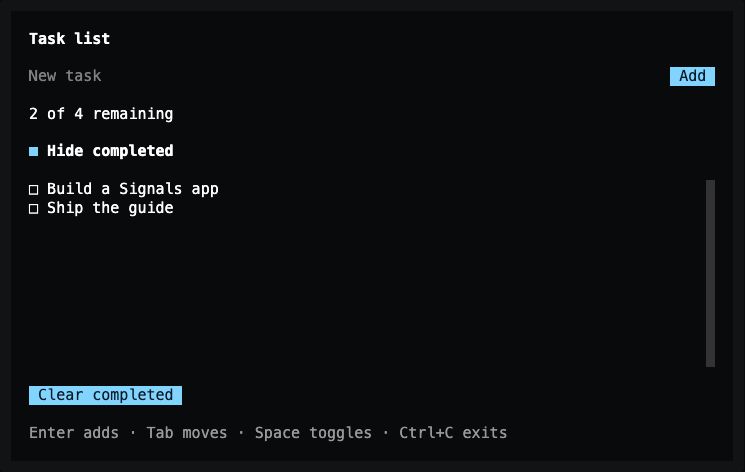
Lesson 5 — hiding changes what the screen shows and keeps the stored list intact.
Now press Clear completed. The two completed records are removed, the summary becomes 2 of 2 remaining, and the button is disabled because nothing is left to remove. A draft typed before filtering or removal stays in the same controller.
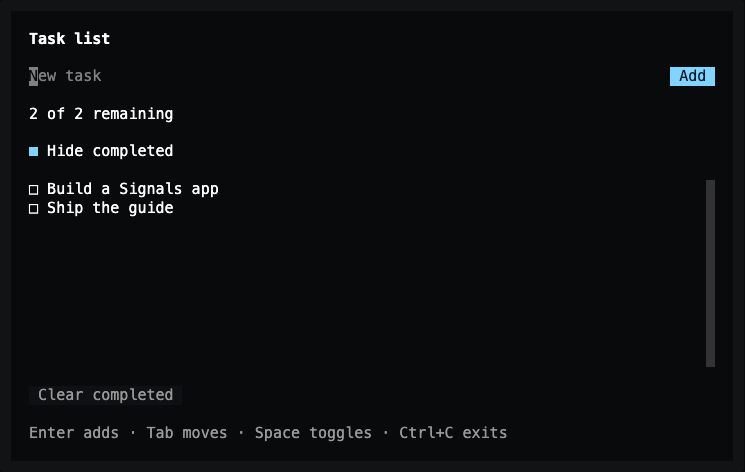
After removal — the visible rows stay the same, and the total now counts the two remaining records.
Exact changes for lesson 5
The checkpoint below is the shipped example/task_list.dart, so this diff also
adds its doc comments. They do not change behavior.
--- lesson-4
+++ lesson-5
@@ -3,11 +3,14 @@

 void main() => runTuiApp(const TaskListApp(), enableMouse: true);

+/// A task list with hook-owned input and derived Signals state.
 class TaskListApp extends SignalWidget {
+  /// Creates the task-list screen.
   const TaskListApp({super.key});

   @override
   Widget build(BuildContext context) {
+    // Call hooks in the same order on every build. Each owns its lifetime.
     final draft = useTextEditingController();
     final tasks = useSignal(<({int id, String title, bool done})>[
       (id: 0, title: 'Read the hooks guide', done: false),
@@ -17,12 +20,20 @@
     final remaining = useComputed(
       () => tasks.value.where((task) => !task.done).length,
     );
+    final hideCompleted = useSignal(false);
+    final visible = useComputed(
+      () => [
+        for (final task in tasks.value)
+          if (!hideCompleted.value || !task.done) task,
+      ],
+    );
     final nextId = useRef(3);
     final theme = Theme.of(context);

     void addTask() {
       final title = draft.text.trim();
       if (title.isEmpty) return;
+      // Replace the list so Signals observes the change. IDs survive filtering.
       tasks.value = [
         ...tasks.value,
         (id: nextId.value++, title: title, done: false),
@@ -61,12 +72,24 @@
             ],
           ),
           Text('${remaining.value} of ${tasks.value.length} remaining'),
+          Checkbox(
+            key: const ValueKey<String>('hide-completed'),
+            label: 'Hide completed',
+            value: hideCompleted.value,
+            onChanged: (value) => hideCompleted.value = value,
+          ),
           Expanded(
             child: ScrollBox(
               child: Column(
                 crossAxisAlignment: CrossAxisAlignment.start,
                 children: [
-                  for (final task in tasks.value)
+                  if (visible.value.isEmpty)
+                    Text(
+                      tasks.value.isEmpty
+                          ? 'Add your first task.'
+                          : 'All done!',
+                    ),
+                  for (final task in visible.value)
                     Checkbox(
                       key: ValueKey<String>('task-${task.id}'),
                       label: task.title,
@@ -85,6 +108,18 @@
               ),
             ),
           ),
+          Button(
+            key: const ValueKey<String>('clear-completed'),
+            label: 'Clear completed',
+            onPressed: remaining.value == tasks.value.length
+                ? null
+                : () {
+                    tasks.value = [
+                      for (final task in tasks.value)
+                        if (!task.done) task,
+                    ];
+                  },
+          ),
           Text(
             'Enter adds · Tab moves · Space toggles · Ctrl+C exits',
             style: TextStyle(color: theme.textMuted),
Complete code after lesson 5
import 'package:noir/noir.dart';
import 'package:noir_signals/noir_signals.dart';

void main() => runTuiApp(const TaskListApp(), enableMouse: true);

/// A task list with hook-owned input and derived Signals state.
class TaskListApp extends SignalWidget {
  /// Creates the task-list screen.
  const TaskListApp({super.key});

  @override
  Widget build(BuildContext context) {
    // Call hooks in the same order on every build. Each owns its lifetime.
    final draft = useTextEditingController();
    final tasks = useSignal(<({int id, String title, bool done})>[
      (id: 0, title: 'Read the hooks guide', done: false),
      (id: 1, title: 'Run the counter example', done: true),
      (id: 2, title: 'Build a Signals app', done: false),
    ]);
    final remaining = useComputed(
      () => tasks.value.where((task) => !task.done).length,
    );
    final hideCompleted = useSignal(false);
    final visible = useComputed(
      () => [
        for (final task in tasks.value)
          if (!hideCompleted.value || !task.done) task,
      ],
    );
    final nextId = useRef(3);
    final theme = Theme.of(context);

    void addTask() {
      final title = draft.text.trim();
      if (title.isEmpty) return;
      // Replace the list so Signals observes the change. IDs survive filtering.
      tasks.value = [
        ...tasks.value,
        (id: nextId.value++, title: title, done: false),
      ];
      draft.clear();
    }

    return Container(
      color: theme.surface,
      padding: const EdgeInsets.symmetric(horizontal: 2, vertical: 1),
      child: Column(
        crossAxisAlignment: CrossAxisAlignment.start,
        spacing: 1,
        children: [
          const Text(
            'Task list',
            style: TextStyle(fontWeight: FontWeight.bold),
          ),
          Row(
            spacing: 1,
            children: [
              Expanded(
                child: TextInput(
                  key: const ValueKey<String>('task-draft'),
                  controller: draft,
                  autofocus: true,
                  placeholder: 'New task',
                  onSubmit: addTask,
                ),
              ),
              Button(
                key: const ValueKey<String>('add-task'),
                label: 'Add',
                onPressed: addTask,
              ),
            ],
          ),
          Text('${remaining.value} of ${tasks.value.length} remaining'),
          Checkbox(
            key: const ValueKey<String>('hide-completed'),
            label: 'Hide completed',
            value: hideCompleted.value,
            onChanged: (value) => hideCompleted.value = value,
          ),
          Expanded(
            child: ScrollBox(
              child: Column(
                crossAxisAlignment: CrossAxisAlignment.start,
                children: [
                  if (visible.value.isEmpty)
                    Text(
                      tasks.value.isEmpty
                          ? 'Add your first task.'
                          : 'All done!',
                    ),
                  for (final task in visible.value)
                    Checkbox(
                      key: ValueKey<String>('task-${task.id}'),
                      label: task.title,
                      value: task.done,
                      onChanged: (done) {
                        tasks.value = [
                          for (final item in tasks.value)
                            if (item.id == task.id)
                              (id: item.id, title: item.title, done: done)
                            else
                              item,
                        ];
                      },
                    ),
                ],
              ),
            ),
          ),
          Button(
            key: const ValueKey<String>('clear-completed'),
            label: 'Clear completed',
            onPressed: remaining.value == tasks.value.length
                ? null
                : () {
                    tasks.value = [
                      for (final task in tasks.value)
                        if (!task.done) task,
                    ];
                  },
          ),
          Text(
            'Enter adds · Tab moves · Space toggles · Ctrl+C exits',
            style: TextStyle(color: theme.textMuted),
          ),
        ],
      ),
    );
  }
}
What you built
The screen owns an editable draft, a computed remaining count, a visibility signal, a computed visible list, and stable row IDs. The controller, signals, and computed values are released when the screen unmounts.
SignalWidget hosts hooks. It does not track every signal read in build.
useSignal and useComputed observe the values they own. A model that
somebody else owns is observed with useSignalValue or SignalValueBuilder,
and stays that owner’s responsibility to dispose.
To separate application logic into a model, run the file-search example :
dart run example/file_search.dartIt retains its model with useMemoized, registers useOnDispose(model.dispose),
and observes each derived source with SignalValueBuilder. The
Signals guide explains that ownership and observation
contract, and the hooks guide covers controllers, effects,
and custom hooks.
Previous: Add a task.